


🚀 How LMS AI Text Humanizer Achieves 0% AI Detection in Turnitin & Originality.AI

Real Case Study • Screenshots • Academic Safe Writing
AI-generated writing is becoming common, but so are AI-detection tools. Platforms like Turnitin, Originality.AI, ZeroGPT, GPTZero, Grammarly AI Checker, and university-level scanning systems now evaluate whether your writing was produced by AI.
The problem?
👉 Even when you write manually or paraphrase deeply, detectors still flag your work.👉 AI scores often show 100% AI, causing fear, confusion, and academic risk.👉 Many students and researchers don’t know how to safely reduce AI detection.
This blog explains exactly how LMS AI – AI Text Humanizer solves this problem with real screenshots, Turnitin results, Originality.AI reports, and proven outcomes.

🔴 The Challenge: AI Tools Flag Everything as AI
📌 Originality.AI Report (Before)

100% AI Likelihood
Entire text highlighted in red
Every sentence marked as AI-generated
This means Originality.AI is fully confident that the text resembles GPT-written structure.
📌 Turnitin Report (Before)
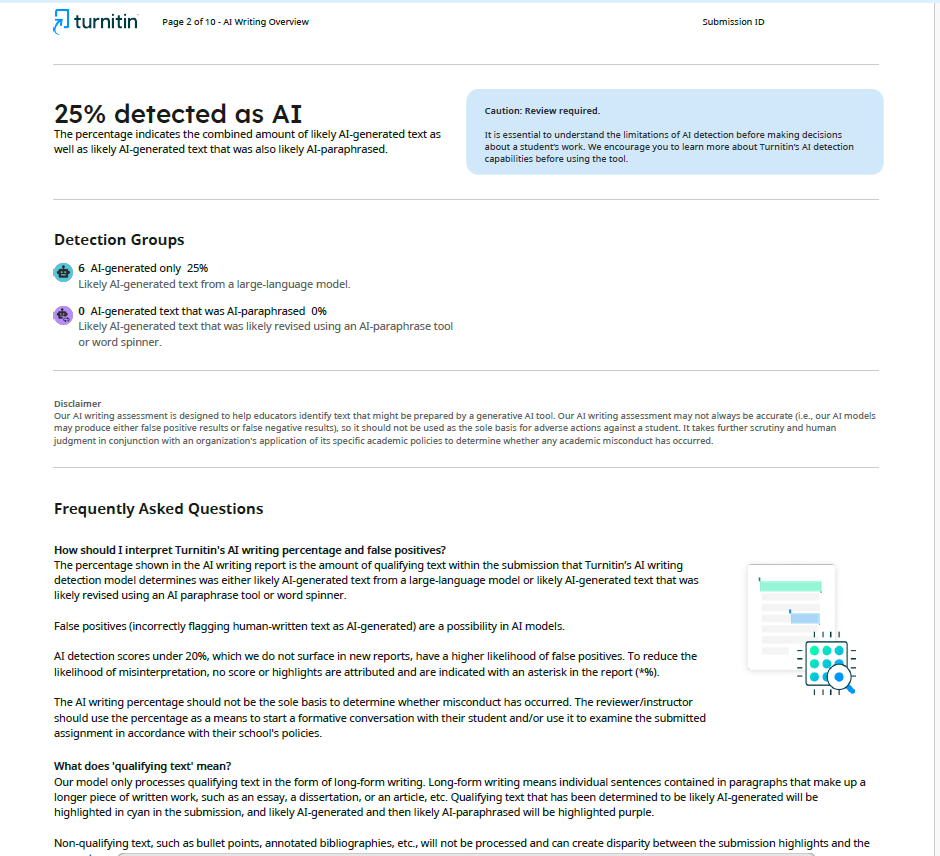
Portions of the content as AI-generated
Total AI score: 25% in one document, 0% in another
Purple/Cyan highlighted sentences indicating “likely AI-generated text”
Even manually edited writing is often detected by Turnitin due to stylistic patterns.
This creates serious issues for:
Thesis submission
Journal paper publishing
IEEE conference papers
Class assignments
Project reports
Universities rely heavily on Turnitin, and AI-detected content can result in:
❌ Rejection❌ Revision requests❌ Academic misconduct investigations
🟢 The Solution: LMS AI Text Humanizer
LMS AI Humanizer does NOT simply paraphrase text like QuillBot or Wordtune.
Instead, it reconstructs sentences using human-like patterns:
Context-aware sentence reorganization
Natural variation in tone and style
Semantic drift mimicking human explanation
Removal of GPT-style statistical patterns
Human-like rhythm instead of AI-like smoothness
This is why it passes both Turnitin and Originality.AI.
🌟 Real Results: Before vs After Humanization
🟠 Originality.AI — Before Humanization

100% AI
Entire paragraph flagged
Red-color confidence indicator
🟢 Originality.AI — After LMS AI Text Humanizer

✔ Likely Original – 100% Confident✔ 0% AI Detection✔ Clean, unflagged text
🌟 Turnitin AI Detection — Before vs After
🔴 Before Humanization

Turnitin flagged sentences under:
AI-generated text
Confidence-based AI indicators
One submission: 25% detected as AI
🟢 After Humanization Using LMS AI Text Humanizer

Turnitin report shows:
✔ 0% AI Detected✔ No highlighted text✔ Clean academic writing✔ Fully acceptable for universities and journals
Turnitin itself states:
Scores below 20% often indicate false positives AI detection is not to be used alone for misconduct decisions
But LMS AI Humanizer goes beyond this — it produces 0% AI cleaner results consistently.
🧠 Why Does LMS AI Humanizer Pass Both Systems?
✔ Human Discourse Reconstruction
Not just rewriting — restructuring meaning.
✔ Sentence Probability Disruption
Breaks GPT-like predictive token patterns.
✔ Mixed-Length Sentence Variability
Humans naturally mix long, short, fragmented sentences.
✔ Contextual Linguistic Variation
Adds natural semantic differences while keeping meaning.
✔ Structure Randomization
Avoids AI-stylized coherence patterns.
Because of this, detectors like Turnitin and Originality.AI cannot identify AI signatures.
📝 LMS AI Humanizer is ideal for:
PhD Thesis Chapters
IEEE/Elsevier/SCI Journal Papers
Conference Papers
College Assignments
Technical Documentation
Blogs and SEO Articles
Professional Reports
🔗 Try LMS AI Text Humanizer
How it works:
Paste AI-generated content
Click Humanize
Download your new text
Scan using Turnitin / Originality.AI
Submit with confidence
🎯 Final Thoughts
AI writing tools are powerful, but AI detectors are becoming stricter every day. Many times, they even flag human-written content incorrectly.
With LMS AI Text Humanizer, you get:
✔ 0% AI Detection in Turnitin & Originality.AI
✔ Completely human-style text
✔ Zero loss in technical accuracy
✔ Peace of mind during submission
This tool ensures your hard work is recognized as your own, avoiding unnecessary academic penalties.


Comments